Custom AI software for client onboarding
We build software that collects client details, checks documents, prepares files and keeps your team informed. We design it around your onboarding steps, approval rules and existing tools.
For teams that spend time chasing information and copying it between forms, documents and customer records.
- Client forms
- Signed agreements
- Documents and messages
- Matches the client
- Checks the information
- Prepares the file
- Passes it to your team
- Your client records
- Documents and folders
- Your delivery team
The problem, and what we build
What slows your team down, and the software we build for it
Each problem is paired with the part of the software that addresses it.
Clients repeat the same details
Your team asks for information that is already in a form or customer record.
What we buildCollects and reuses client details
Missing information delays the next step
Someone has to check each submission and work out what is still needed.
What we buildChecks what is missing or inconsistent
Every client file is built by hand
Staff copy details into documents, spreadsheets and folders after an agreement is signed.
What we buildPrepares the client’s files
Your team has to chase documents
Reminder messages and follow-up dates are kept in separate inboxes or notes.
What we buildFollows up on missing information
The next person lacks the full picture
Staff cannot easily see what is ready, what is missing or who needs to act.
What we buildKeeps staff informed
Collects and reuses client details
Reads agreed sources and puts the information in the right client record. Uncertain matches go to a person.
Checks what is missing or inconsistent
Checks required fields and documents, then shows your team the gaps. Decisions that need professional judgement stay with a person.
Prepares the client’s files
Fills agreed templates and creates documents or folders for the correct client. Your team can review them before they are shared.
Follows up on missing information
Drafts reminders or sends approved messages, records replies and stops when a person needs to help.
Keeps staff informed
Updates the record and tells the right person what is ready, what is blocked and what needs their approval.
What gets tailored
The decisions we make with you
Channels, tools and rules are your choices. A past project does not set the limits of yours.
How onboarding starts
Choose the event that starts the work.
What clients need to provide
Agree the information and documents required for your service.
What gets prepared
Use your own templates and storage rules.
Who checks the work
Keep approvals with the staff responsible for them.
How clients hear from you
Set the wording, timing and stop rules.
Where the information belongs
Check what your current tools allow before choosing connections.
Is custom software right for you?
We check what you already have before we build anything
Your current tools may be enough when
- Your current form and customer system already collect the required information.
- Built-in templates and reminders cover the steps your team needs.
- Staff can review exceptions without copying information between tools.
Custom software helps when
- Client information must move through several systems with your own rules.
- Your documents or approval steps differ by client or service.
- You need to check identity matches and keep each client’s files separate.
- Your team needs a record of checks, handovers and failed steps.
Related work
Projects that show this work
Each project was built for one client's process. It shows what is possible; your build starts from your own choices.
Business funding
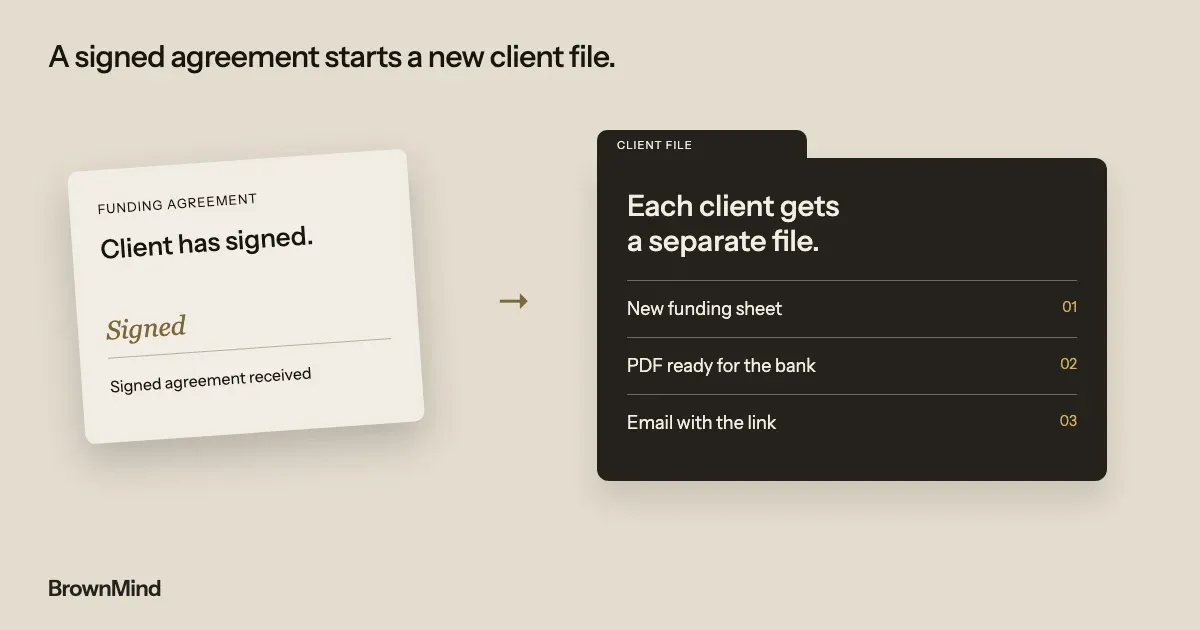
Client files prepared after a funding agreement is signed
Fundwell Advisory’s system finds the client’s intake details, creates a separate sheet, prepares a PDF and emails the file link with the team copied.
The client must use the same email on the intake form and agreement. A mismatch stops the run and alerts the team. This project does not establish lending outcomes or current use.
ShowsCollects and reuses client details · Checks what is missing or inconsistent · Prepares the client’s files · Keeps staff informed
Designed and built by our founder, as lead developer for a partner agency.
Paid trial, build, run
How we start, and who runs it afterwards
01
A 20-minute call
We talk through the problem, your current tools and who needs the result. We also check whether software you already have could do the job. It is not a sales call.
02
A paid trial
We take one onboarding path and a sample of representative client records, then test matches, missing information, file preparation and staff approvals. Before it starts, we agree the scope, the price, the timing and how we will judge it.
03
The full build
We build what the trial showed is worth building, and test normal work, unusual cases and handovers to your team before launch.
04
Running it with you
After launch, we monitor the software, fix problems and improve it each month. You have a named contact, and the rules can change as your business does.
Questions
Questions people ask before a call
- Can this work with our current forms and customer system?
- Often, yes. We first check how your tools share data and which permissions they support. We agree any gaps before building.
- Will AI decide whether a client is approved?
- Approval decisions stay with your responsible staff. The software can organise information and flag gaps for review. We agree which routine actions it may take.
- What happens if information belongs to the wrong client?
- We agree matching rules and test them with unusual cases. If a match is uncertain, the software stops that step and asks a person to check.
- Can we start with just preparing the files?
- Yes. A first trial can cover one part, such as preparing documents after an agreement is signed. Reminders and other connections can be separate decisions.
- What does it cost, and how long does it take?
- It depends on the documents, checks, approval steps and connections you need. We agree the scope, price, timing and how we will judge the trial before any work starts.
Show us how a new client gets started
On a 20-minute call, we look at how your team works today and tell you whether custom software is worth it.